
Assigning a ringtone to an iPhone has always been a big problem. With the method we’ll explain below, you’ll now be able to easily set a ringtone on an iPhone without using iTunes. Assigning an MP3-format ringtone to iPhone mobile phones will no longer be a problem. Thanks to a few small steps and a small app, you can easily carry out this process.
- First, we download a song we like from YouTube to our computer in MP3 format using one of the online download pages. I used the http://www.youtube-mp3.org/tr site.

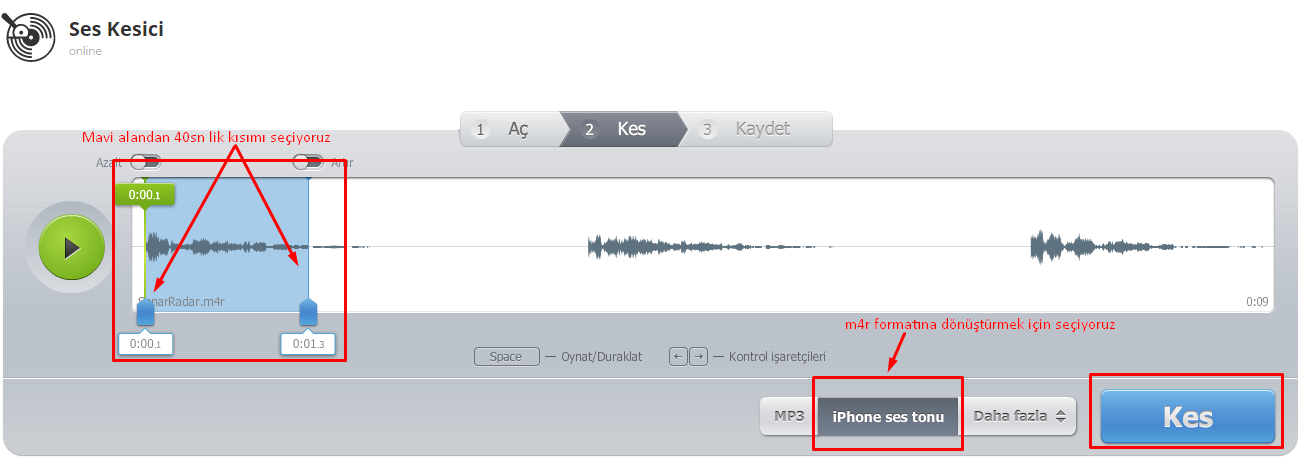
- We convert the MP3 file we downloaded to .m4r format using an online converter again, and trim its duration to 40 seconds. (On iPhones, ringtones cannot be longer than 40 seconds.)
- Finally, we download the program we’ll use for the transfer from http://www.copytrans.net/download/.
After clicking the “Add Content” bubble and waiting for the 10-second countdown on the right for free users, we can send the .m4r file to our phone and start using it as a ringtone.

Thanks to this app, you can easily do many things, not just ringtones.
Share your experience
Got a question, a different solution or a note to add?
Log in or join us to write a comment.
Log in ↗︎Sign up ↗︎