
If you get overwhelmed by spam messages when you place an email sending form on your website, you can get rid of this trouble by using Google reCAPTCHA.

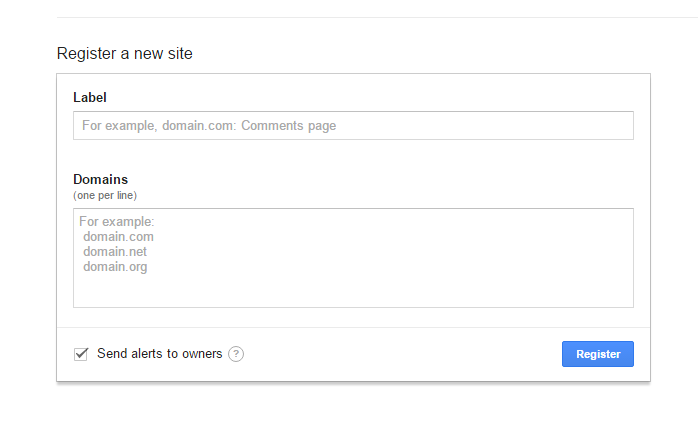
First, we log in to the Google Recaptcha Admin console and define our site with a small step.
Let’s make a note of the Site Key and Secret Key fields.
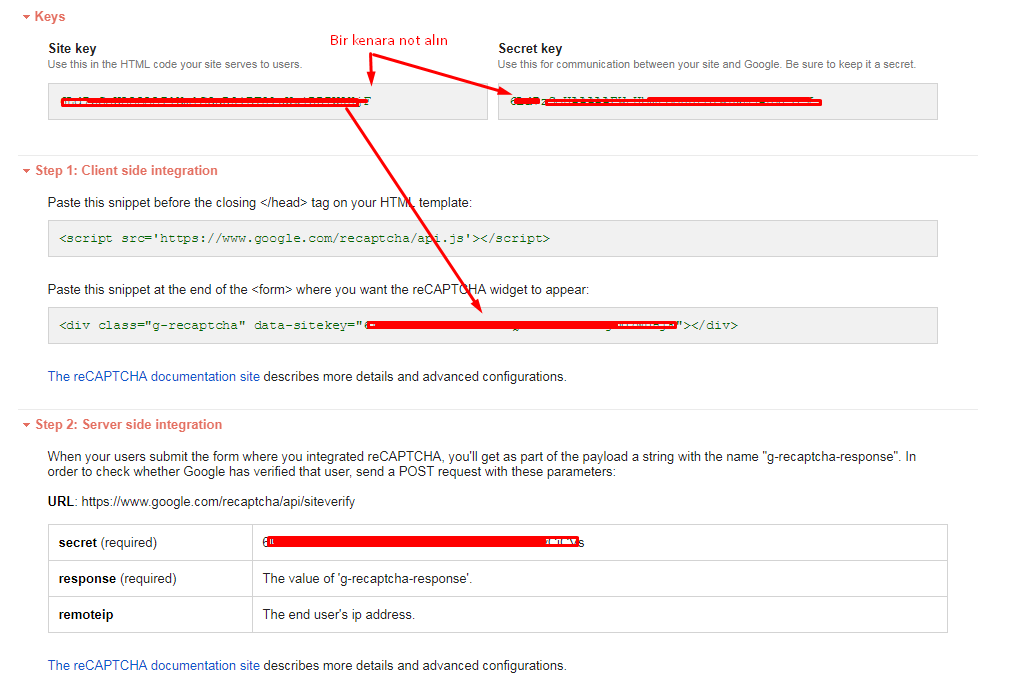
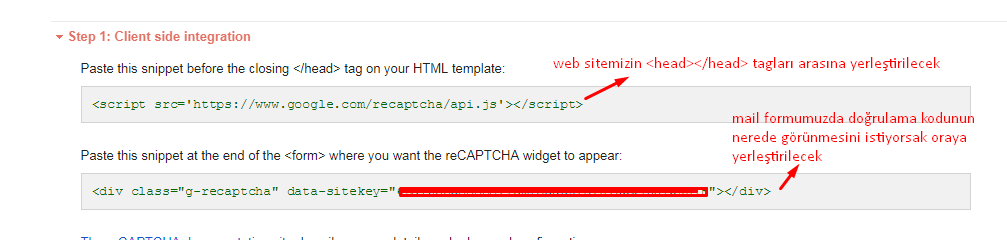
The code snippets we will add to our site are as follows. We will use them shortly.
Now, assuming that we have a contact form (form.html)
and a PHP file where the contact form will be processed (MailGonder.php)
we continue with the steps.
Inside form.html, wherever we want our verification code to appear, we place the code snippet that starts with “<div>” there.
 Example:
<div class="row">
    <div class="col-md-12">
        <div class="form-group">
            <label for="form_message">Mesajınız *</label>
            <textarea id="form_message" name="message" class="form-control" placeholder="iletmek istedikleriniz *" rows="4" required="required" data-error="Please,leave us a message."><? echo $_GET['msg']; ?></textarea>
            <div class="help-block with-errors"></div>
            <div class="g-recaptcha" data-sitekey="DAHA_ONCE_NOT_ALDIGINIZ_SITE_KEY"></div>
        </div>
    </div>
While our page is loading, Google needs to load its library so it can perform the necessary operations; for this, we paste the following code just before the </head> tag. (Depending on usage, you may need to add it to your index page or form.html.)

Example:
<link rel="stylesheet" type="text/css" href="style.css"/>
<link rel="stylesheet" href="l_box/css/lightbox.min.css">
<script src="https://www.google.com/recaptcha/api.js"></script>
</head>
Now we come to the final and important part: with the following code snippet, we will make our MailGonder.php file, which you will use to send mail, decide based on the results of the robot verification.
just in the link below, into the NOT_ALDIGINIZ_SECRET_KEY_YAZILACAK part, don’t forget to write the Secret Key value found in the 3rd image.
      //Robot Kontrol

      if (isset($_POST['g-recaptcha-response'])) {
          $captcha = $_POST['g-recaptcha-response'];
      }
      if (!$captcha) {
          echo '<div class="alert alert-warning" role="alert"><h3>Lütfen Geri dönüp robot olmadığınızı doğrulayın.</h3></div>';
          exit;
      }
      $kontrol = file_get_contents("https://www.google.com/recaptcha/api/siteverify?secret=NOT_ALDIGINIZ_SECRET_KEY_YAZILACAK&response=" . $captcha . "&remoteip=" . $_SERVER['REMOTE_ADDR']);
      if ($kontrol.success == false) {
          echo '<div class="alert alert-warning" role="alert"><h3>Lütfen Geri dönüp robot olmadığınızı doğrulayın.</h3></div>';
      } else {
           echo 'İşlem Başarılı Mail gönderme fonksiyonunuzu çalıştırabilirsiniz';


      //Robot Kontrol
}
You can use this Google service as a robot verification for any kind of data entry, not just email.

Share your experience
Got a question, a different solution or a note to add?
Log in or join us to write a comment.
Log in ↗︎Sign up ↗︎