
macOS 27 Golden Gate released
What’s new on Mac and the Turkish Siri detail
Apple’s new Mac operating system macOS 27 Golden Gate was released on September 14, 2026. The update highlights Siri AI, AI features added to everyday apps, and interface improvements. For users in Turkey, the point to pay attention to is the language support of the new features. Apple’s release announcement
So what awaits Mac users, and which devices can get the update?
Siri AI: A more comprehensive assistant on Mac
The new Siri app brings conversations together in one place.

The new Siri AI is presented as an assistant that can follow natural conversations and search across personal content. According to Apple’s description, its uses include finding emails, photos, and notes, performing actions in apps, and answering questions using information from the internet.
With the separate Siri app, it’s also possible to return to previous conversations and continue a conversation started on one Apple device on another. Siri is also integrated into Spotlight search. macOS 27 features
Turkish Apple Intelligence doesn’t mean Turkish Siri AI
This is the most important detail to know before installing the update in Turkey.
Turkish is among the languages supported by Apple Intelligence. However, the new Siri AI is initially distributed as an English beta. Apple announces that it plans French, Japanese, Korean, Portuguese, and Spanish support in October; Turkish is not on that schedule.
Therefore, installing macOS 27 doesn’t mean you can use all the new Siri AI features in Turkish. Other AI features may also have language, region, and usage limits. Apple’s availability statement
Safari can track changes on pages
Safari’s Notify Me feature provides notifications for changes on a tracked page.
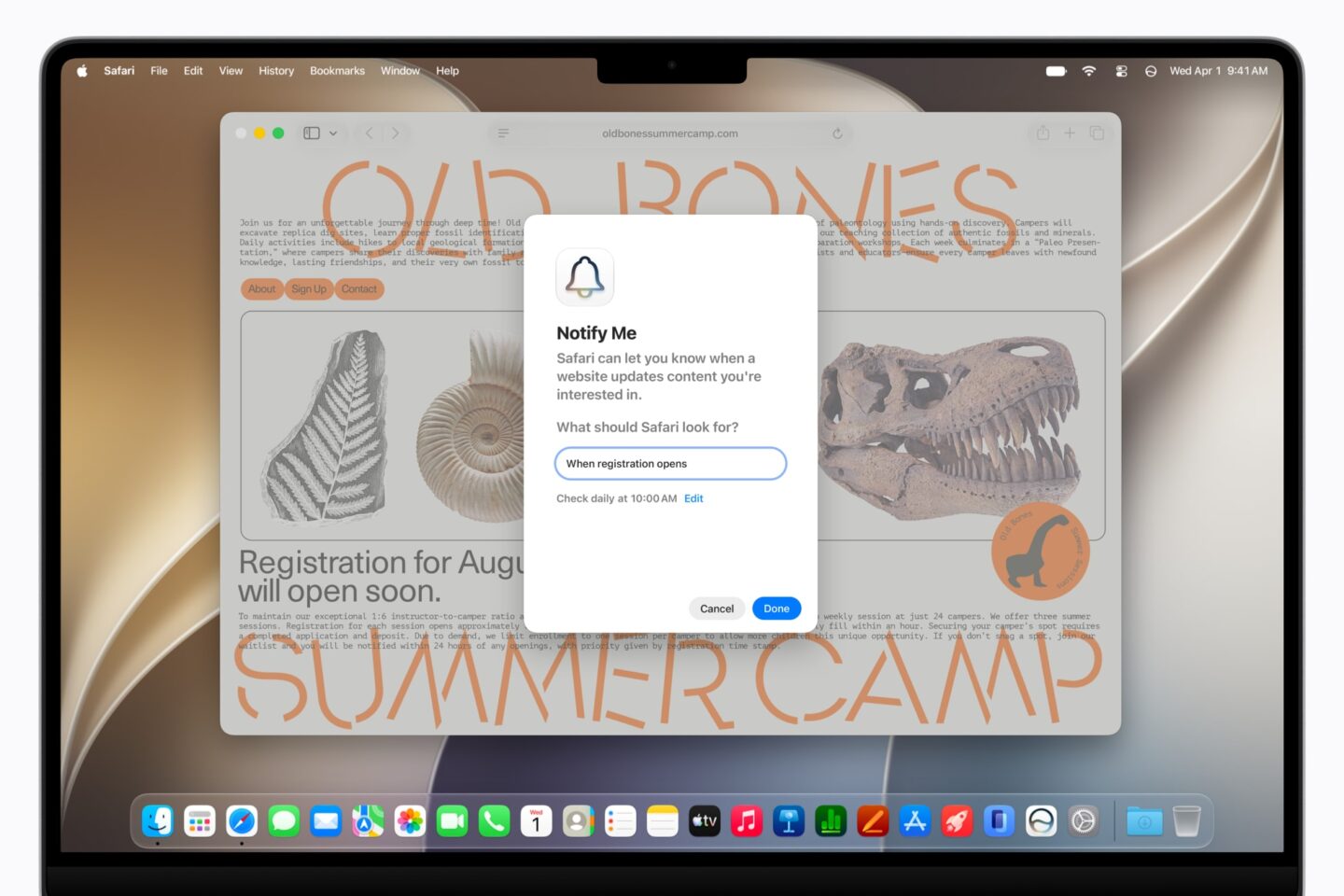
Notify Me, coming to Safari, aims to track changes on a web page such as a price drop or an item coming back in stock. This can reduce the need to repeatedly open and check a page you’re interested in.
Automatic grouping of tabs by topic is also a notable new feature for users who work with many pages. Apple’s announcement
You can ask questions about content on the screen
Visual Intelligence lets you select a window on the screen and ask about its content or start a related action. Apple gives adding an event to the calendar from information on the screen as an example.
The keyboard shortcut specified to access the feature is Shift + Command + Space. Being able to get help while working with a document or image without moving the content to another app is one of the practical uses of this feature. Apple release notes
More control over the Liquid Glass look
macOS 27 improves the Liquid Glass design in terms of readability and consistency. The new settings bar allows you to make the look more transparent or more colorful.Toolbars, sidebars, and app icons are also getting an overhaul. Apple also notes speed improvements in areas such as AirDrop transfers and browsing files over the network. These are the manufacturer’s claims; you shouldn’t expect the same performance boost on every Mac. Apple release notes
Shortcuts and parental controls get a refresh
In Shortcuts, there’s a feature that lets you create automations by describing the task you want to do in natural language. In parental controls, meanwhile, Ask to Browse, which lets children ask for permission before opening a new website, along with options to set time limits by app category and schedule usage times, stands out. Apple release notes
Which Mac models get macOS 27?
Apple’s compatibility list is as follows:
| Mac model | Supported versions |
|---|---|
| MacBook Neo | 2026 |
| MacBook Air | Apple silicon, 2020 and later |
| MacBook Pro | Apple silicon, 2020 and later |
| iMac | Apple silicon, 2021 and later |
| Mac mini | Apple silicon, 2020 and later |
| Mac Studio | 2022 and later |
| Mac Pro | Apple silicon, 2023 |
Intel-based Macs are not on this list. Also, the model year alone isn’t enough: especially with 2020 models, you need to check whether the processor is Apple silicon. Apple’s list of compatible devices
How do you install macOS 27?
First, back up your files. Then follow Apple menu → System Settings → General → Software Update. This section shows updates compatible with your Mac. Apple’s installation guide
If you use your Mac for work, checking the compatibility of your critical apps, plug-ins, and peripherals before updating is also a good place to start.
In macOS 27, especially Safari’s page tracking and more flexible interface settings are innovations that touch everyday use. As for the new Siri, when deciding, you need to look not only at the capabilities in the announcement but also at which features are available in the language you’ll use.



Share your experience
Got a question, a different solution or a note to add?
Log in or join us to write a comment.
Log in ↗︎Sign up ↗︎